Subscribe to Comments Reloaded is a robust plugin that enables commenters to sign up for e-mail notification of subsequent entries. The plugin includes a full-featured subscription manager that your commenters can use to unsubscribe to certain posts or suspend all notifications. It solves most of the issues that affect Mark Jaquith’s version, using the latest WordPress features and functionality. Plus, allows administrators to enable a double opt-in mechanism, requiring users to confirm their subscription clicking on a link they will receive via email or even One Click Unsubscribe.
Requirements
- WordPress 4.0 or higher
- PHP 5.6 or higher
- MySQL 5.x or higher
Main Features
- Easily manage and search among your subscriptions
- Imports Mark Jaquith’s Subscribe To Comments (and its clones) data
- Messages are fully customizable, no poEdit required (and you can use HTML!) with a Rich Text Editor – WYSIWYG
- Disable subscriptions for specific posts
- One Click Unsubscribe
- Get and Download your System information for better support.
Language Localization
If you would like to help out translating the plugin to your language you can do so through the official WordPress plugin translation system

Manage your subscriptions 
Use your own messages to interact with your users 
Configure the Virtual Management page 
Customize the notification messages with a the wonderful WordPress Rich Text Editor – WYSIWYG 
Customize the plugin’s behavior 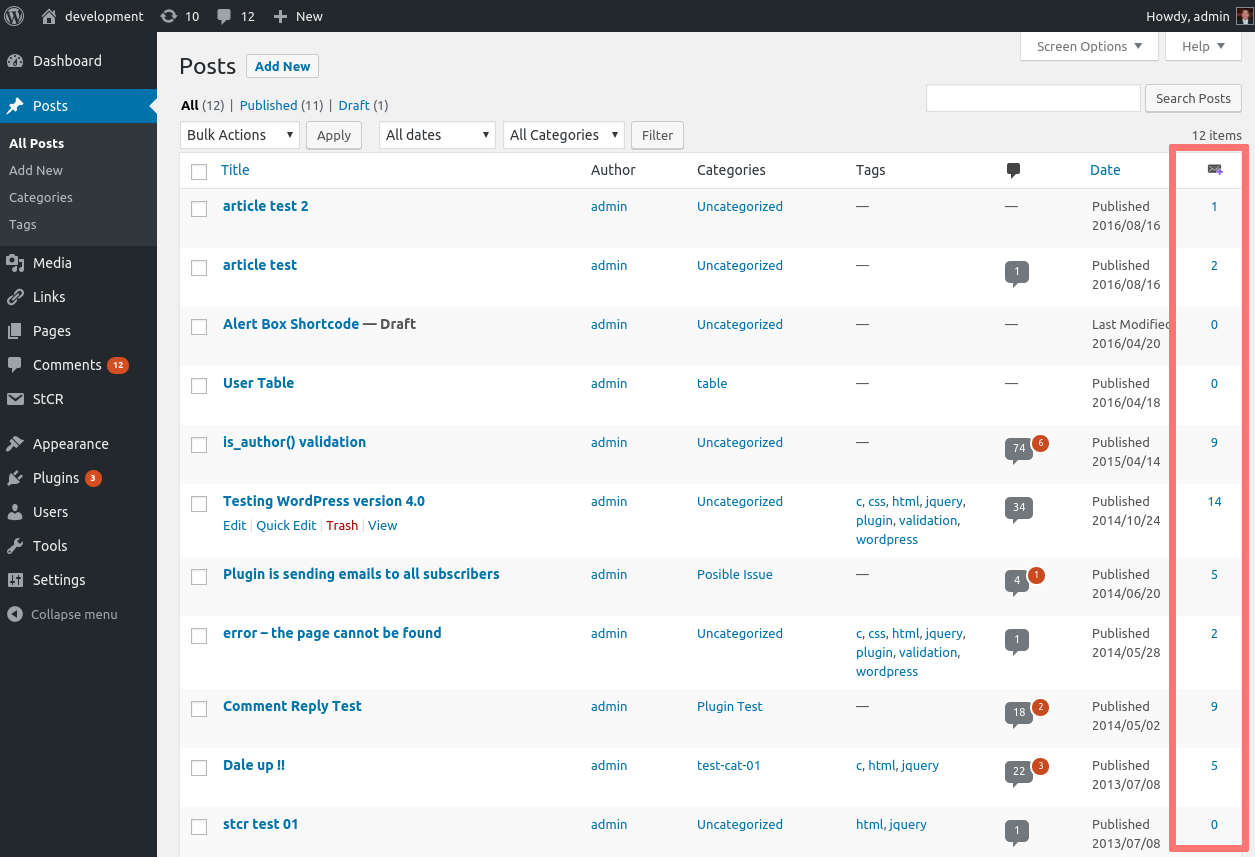
Check the number of subscribers in your posts. 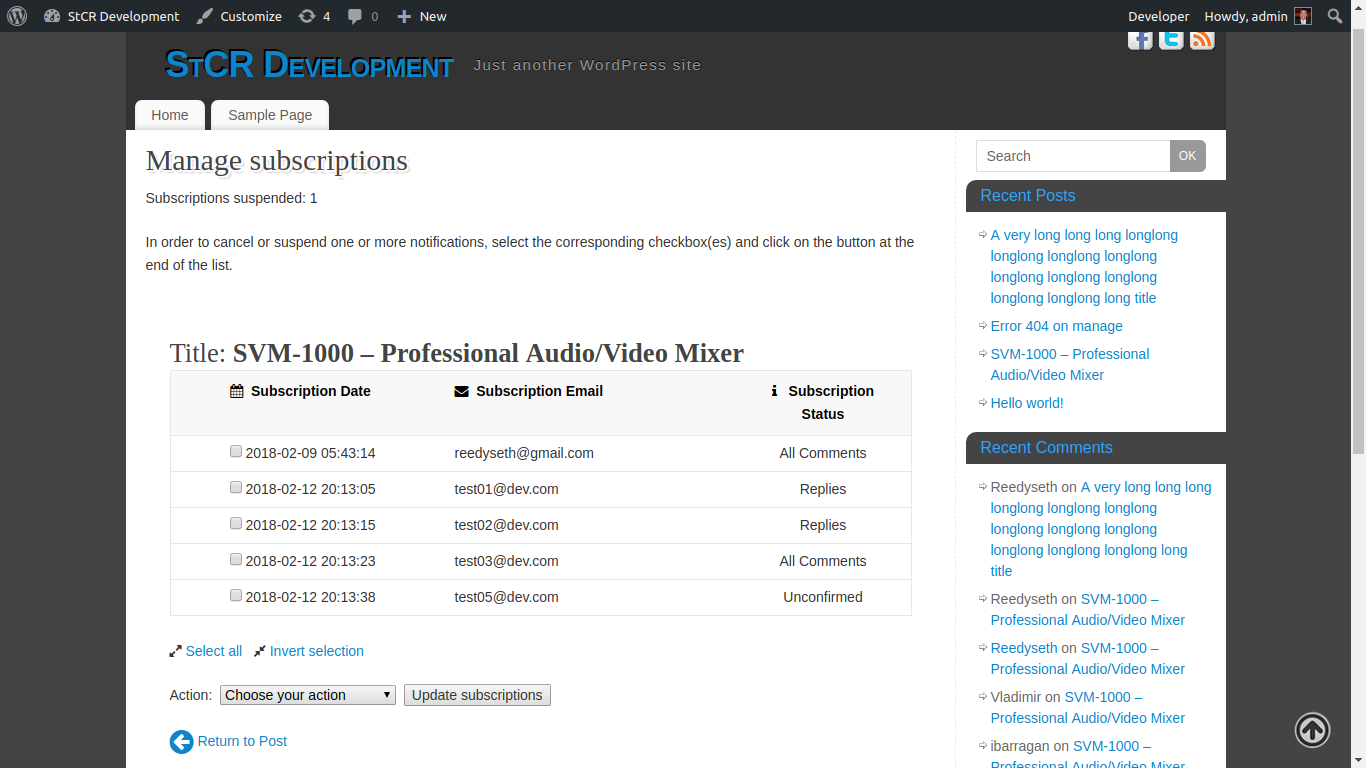
Manage the subscriptions on the Frontend Side.
- If you are using Subscribe To Comments by Mark Jaquith, disable it (no need to uninstall it, though)
- Upload the entire folder and all the subfolders to your WordPress plugins’ folder. You can also use the downloaded ZIP file to upload it.
- Activate it
- Customize the Permalink value under Settings > Subscribe to Comments > Management Page > Management URL. It must reflect your permalinks’ structure
- If you don’t see the checkbox to subscribe, you will have to manually edit your template, and add
<?php global $wp_subscribe_reloaded; if (isset($wp_subscribe_reloaded)){ echo $wp_subscribe_reloaded->stcr->subscribe_reloaded_show(); } ?>somewhere in yourcomments.php - If you’re upgrading from a previous version, please make sure to deactivate/activate StCR.
- You can always install the latest development version by taking a look at this Video
-
Are there any video tutorials?
-
Yeah, I have uploaded a few videos for the following topics:
- Issues Updating StCR via WordPress Update
- Issues with StCR links see StCR Clickable Links
- Issues with empty emails or management messages? see StCR Management Message
- Upgrading from the latest development version see Upgrading
-
Why my notifications are not in HTML format?
-
Don’t worry, just go to the Options tab an set to Yes the Enable HTML emails option.
-
How can I reset all the plugin options?
-
There is a new feature called Safely Uninstall that allow you to delete the plugin using the WordPress plugin interface. If you have the option set to Yes everything but the subscriptions created by the plugin will be wipeout. So after you made sure that you have this option to Yes you can deactivate the plugin and the delete it. Now you have to install the plugin via WordPress or Upload the plugin
zipfile and activate it, after this step all your settings will be as default and your subscriptions will remain.
There is a new feature added on the Options tab where you can reset all the settings by using only one click. You can either wipe out all the subscriptions or keep them. -
What can I do if the **Safely Uninstall** does not have any value?
-
Just deactivate and activate the plugin and you are all set. The default value will be Yes.
-
Aaargh! Were did all my subscriptions go?
-
No panic. If you upgraded from 1.6 or earlier to 2.0+, you need to deactivate/activate StCR, in order to update the DB structure. After the version 180212 a fix was applied so that you can see all the subscriptions.
-
Can I customize the layout of the management page?
-
Yes, each HTML tag has a CSS class or ID that you can use to change its position or look-and-feel.
-
How do I disable subscriptions for a given post?
-
Add a custom field called
stcr_disable_subscriptionsto it, with value ‘yes’ -
How do I add the management page URL to my posts?
-
Use the shortcode
[subscribe-url], or use the following code in your theme:
global $wp_subscribe_reloaded; if (isset($wp_subscribe_reloaded)){ echo ‘Subscribe“; -
Can I move the subscription checkbox to another position?
-
Yes! Just disable the corresponding option under Settings > Comment Form and then add the following code where you want to display the checkbox:
stcr->subscribe_reloaded_show(); } ?> -
What if after update to the version 141024 I still see plain HTML messages?
-
The information of your configuration needs to be updated. Go to the Subscribe to Comments Reloaded settings and click the
Save Changesbutton on the tab
where you have you messages with HTML. -
How to generate a new Key for my Site?
-
Just go to the Options Panel and click the generate button. By generating a new key you prevent the spam bots to steal your links.
Best part? It works! Keep on keepin’ on …
Amazing plugin with lots of options!
I tested it for a long time before I decided to use it. Very good plugin, very nicely done. Maybe the author would create a separate one – for subscription to new posts – if it is not possible to implement it in this one. Great plugin, I recommend it to everyone.
This plugin does not work on latest WordPress 6.3 and PHP 8.1. Using default WP Theme and plugin content is not loaded within the template. The plugin produces multiple text-only repeats of the same content on a blank white page. Email notifications are sent repeatedly as noted in the GitHub issues tracker. This plugin appears to be no longer actively maintained.
I use it since many years. Works fine and without errors. Thanks!
Классный плагин, все четко работает. Совместим с wp review pro. Отлично. THANK YOU!
“Subscribe To Comments Reloaded” is open source software. The following people have contributed to this plugin.
Contributors